2024-04-07 Animating locomotion using OSC Trackers, Retrospective
このページは日本語でご覧いただけます: 日本語
VRChat has a feature called OSC trackers. It exists as a low-cost way to add trackers controlled by software, without needing to create custom SteamVR drivers, and also can be used on Quest standalone headsets.
For the sake of experimentation, I’ve been wanting to try using OSC trackers for locomotion “animations”, where the locomotion animation logic would come from an external program, rather than doing it in an animator controller with animation clips.
Strangely I’ve only written this down recently, but I’m convinced I had been wanting to do this for more than a year already.
Flatscreen Third person games
You’ve played third person games, you know what I will be talking about. Grand Theft Auto, Assassin’s Creed, Uncharted, Metal Gear Solid, they all control a main character in third person. Even when it’s in first person, you have NPCs that move around. There’s an entire industry dedicated to making a game character movement look good.
The idea is to make or reuse a character controller for third person games in an external program, and then give that character OSC trackers, so that this virtual character will be controlling the avatar in VRChat instead of my physical body.
There’s a bunch of interesting talks about this subject. Here’s a few of my favorite talks and demos:
https://www.youtube.com/watch?v=KSTn3ePDt50
- Kristjan Zadziuk (Ubisoft) - GDC 2016 - Motion Matching, The Future of Games Animation
https://www.youtube.com/watch?v=7S-_vuoKgR4
- Michal Mach (Naughty Dog) - GDC 2017 - Physics Animation in Uncharted 4: A Thief's End
https://www.youtube.com/watch?v=RCu-NzH4zrs
- Joe van den Heuvel (Valve) - SIGGRAPH 2021 - Character Locomotion in Half-Life: Alyx
https://www.youtube.com/watch?v=16CHDQK4W5k
- Ubisoft La Forge - SIGGRAPH 2020 - Learned Motion Matching
Generally, I think there’s a bunch of established tech from existing non-VR fields, which I really wonder how they would translate into VR, so I’m barely scratching the surface.
Making this project is partly a way for me to start looking for answers in which game animation techs could be reused in the context of social VR.
VR has its own constraints that put a limit on what’s acceptable, and I think a good way to find those constraints is to break them intentionally or unintentionally.
Motion Matching in Unity by JLPM22
In GDC 2016, Kristjan Zadziuk from Ubisoft presented a technique they devised “Motion Matching” (see the first video above).
This technique caused a ripple in the games industry, as bits of animations for locomotion cycles could be replaced by sampling directly from a specially recorded and labelled continuous motion capture session, to directly drive the character locomotion.
In effect, this creates a very sophisticated character movement in the world, as the character compensates by properly shifting weight when turning or stopping.
An user by the handle of JLPM22 (Jose Luis Ponton) has published an open version of this technique, implemented in Unity:
https://github.com/JLPM22/MotionMatching
This could serve as a good starting point to experiment.
I’ve imported the project, did a few fixes (A, B), to make it run with a social VR avatar I have.
I noticed it mostly ran well, although the idle pose looked weird (the character is leaning forward).
Otherwise the character animates as expected, and it only moves on a flat surface, which should be enough for testing.
Immediately, I anticipate some points that could cause issues later, but it won’t stop me from trying:
- The character takes time to stop and start.
- The head bobs up and down during movement.
- The character takes time to turn.
- The character cannot strafe.
I do not have a motion capture studio, and my room is too small to do proper DIY motion capture for walking long distances in a straight line, so I cannot supplement the existing motion tracking data with my data, so I’ll just try to get it working within those limitations.
OSC Trackers
Next up, add OSC trackers to that character.
This ended up being easy for me, because I’ve already written small library bits for sending OSC trackers data to VRChat for past projects like Double Hip Tracker.
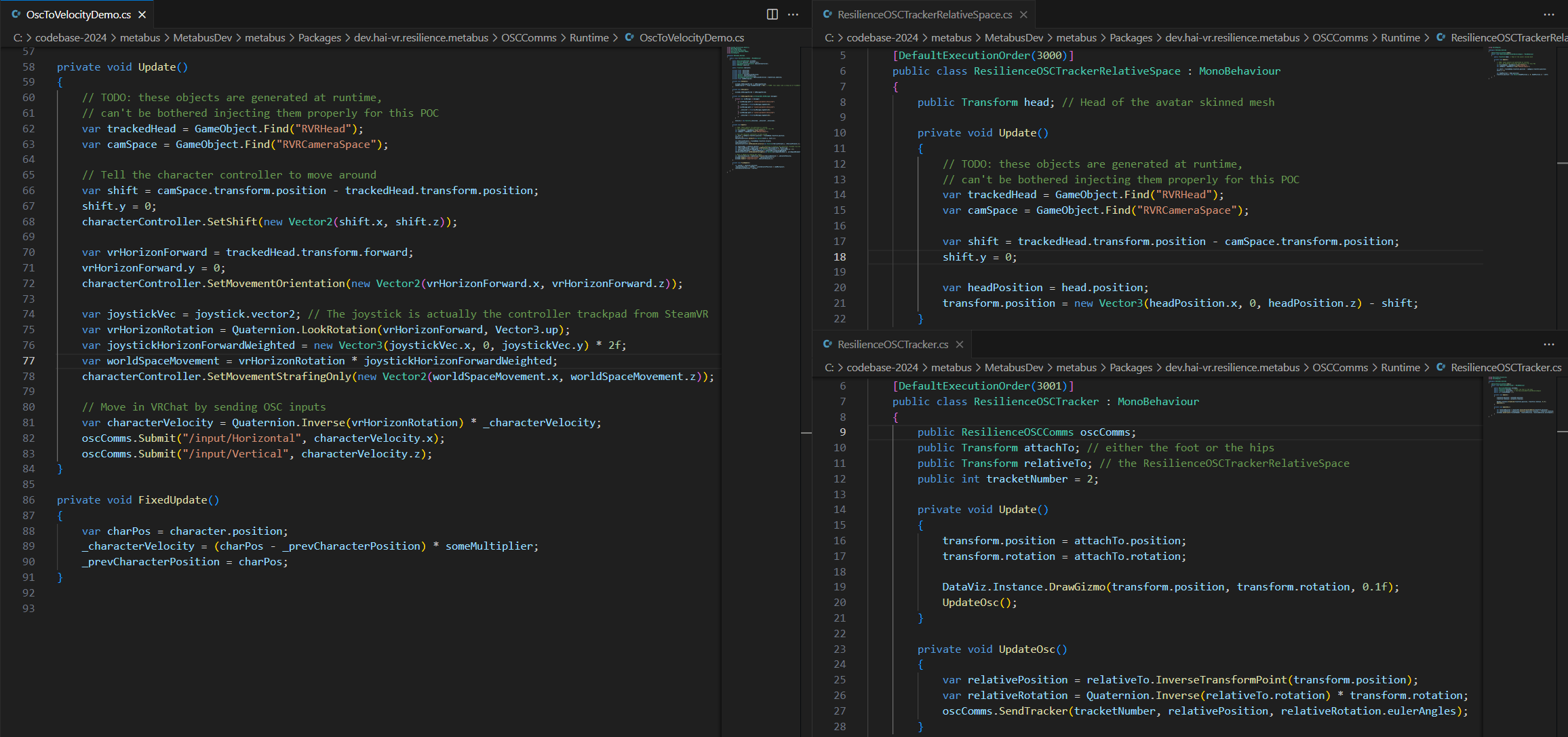
The small issue to take care of is the relativity of the OSC tracker data. The character moves in world space in our external program, but I don’t move in my physical space; the OSC tracker data needs to be sent relative to the head.
There are a few different ways to solve this, one of them might have been to send the head data to VRChat, but instead, I’ve decided to recalculate the position of the OSC trackers to be relative to the X and Z position of the characters’ head, shifted to the HMD X and Z position. The Y position (height) is ignored, as the head of the character moves up and down, while my physical head remains at the same height. I don’t want the feet to sink into the ground as the character bobs up and down.
I need the position of the HMD relative to the playspace in my Unity scene. There are also several ways to get that information, but I have already made SteamVR overlays (and background apps) in Unity in past projects, which includes a way to get the HMD position. Since it’s an overlay, it can still run while VRChat runs in VR.
In order to move the character in my external program, for this iteration:
- I’m still using the thumbstick to move around.
- I’ve settled with getting the avatar parameter for Velocity through OSC, and transmit that information to the character controller.
- In the next iteration, I’ve switched to using the trackpad, explained later.
- The character direction is controlled by the rotation of the HMD (the forward direction of the HMD).
- There’s a few shortcomings (such as looking straight down will flip the body, this is easily solved by using a dot product with the world down direction and then fall back using the up direction of the HMD), but it’s good enough for testing.
Here’s the result:
Some of the problems I had identified earlier are glaringly visible:
The velocity on the VRChat character does not match the movement of the character in my external program, as:
- the character in the external program is better grounded in reality, so it has less reactive movement (this may depend on the requirements of the motion capture performance),
- the velocity in worlds is way too fast for a normal human character, who would be sprinting all the time (and also vary from world to world).
This causes the feet to visibly slide on the ground, as the locomotion in-game is really snappy.
Locomotion comfort?
VRChat rightfully uses a no-acceleration character controller for comfort. All motion is linear motion that is directly mapped to the thumbstick, with no smoothing whatsoever.
Preserving the user comfort tends to be important in games that target all ages; although in recent years, some VR developers are starting to specifically target a new class of young users who are almost born with VR legs and can handle extreme forms of locomotion.
I still have experiences in VR I cannot handle, especially:
- any game that involves rolling the character sideways with acceleration without a visible cage,
- or grounded experiences where the floor cannot be distinguished from the ceiling (i.e. some social VR music venues do this, where the floor and the ceiling are both video players).
I’m still willing to experiment with this, which led me to the second iteration.
The character in my external program becomes the thumbstick
In this iteration, I will no longer move in-game using my thumbstick. Instead, the character in my external program becomes the thumbstick.
I will command the character in my external program to move around using the trackpad of my controller. The Velocity in VRChat is no longer used.
When the character in my external program effectively moves around in the world, that movement will be sent to VRChat using OSC inputs (/input/Vertical and /input/Horizontal).
I’m reading the trackpad using the OpenVR API. I cannot use the thumbstick because it causes a conflict with VRChat thumbstick locomotion, as the OSC input does not seem to take over the controller input when it is sending small values.
Thumbstick movement is relative to the HMD direction, therefore the movement of the character in the external program needs to be converted to become relative to the HMD direction.
This is the result:
This result is much better, the feet movement seems somewhat grounded especially during hard stops; but here’s some things to notice:
- The feet still slides but not as much, which indicates a mismatch between the movement of the VRChat avatar and the character in the external program.
- Fast rotation of the HMD will not translate to a fast rotation of the upper body of the character; this may require better integration with the motion capture data in order to emphasize the head direction.
- The head cannot bob up and down, as it is driven by the HMD position.
- The static VR arms now looks really awkward in contrast to the motion of the character.
- The character movement in the external program cannot account for changes in elevation; also the motion capture data probably does not have this information.
This is how it looks from the outside.
From the inside, the character locomotion is no longer linear, but it does not have smooth acceleration either, it’s somewhere in-between.
There is also a disconnect between the trackpad input and the in-game movement, as this introduces a delay between the input and the actual VR view moving around. This is really destabilizing, but strangely, I do not feel as much VR sickness from it.
Other thoughts
There are still a few other issues, as, if I physically move in my playspace, the legs will not move, but if I command the character to move, then it will send inputs to VRChat to move in-world when it was not necessary. This incorrect feedback is probably solvable, but I’ve already achieved the objective I had set for myself for this proof of concept.
Otherwise, it looks fun, but most likely I will not be touching this proof of concept again, because it is just too much trouble to make it cope with full body tracking.
My takeaway: If I were to build a new iteration of this project, I would try to look into whether it is possible to build a social VR app where the character in first-person is animated differently from the character in third person, so that the networked character animation during locomotion looks good to others, while the character in first-person still remains comfortable to move around**.**
- In VR, first person locomotion would remain direct and linear with the input.
- The character locomotion in first person as seen on mirrors should be reactive and consistent with the first person experience.
- However, the character locomotion in local cameras not taken from a first-person perspective could be driven by third-person locomotion animation systems, whenever the character is moving using the thumbstick, so that it looks good in recorded footage.
- The local character as seen by remote users (= networked) could be driven by third-person locomotion animation systems whenever that local character is moving using the thumbstick.
- This would not apply to the context of social VR games with a competitive aspect where the position of the character in the world is critical for gameplay.
The objective would be to make the character locomotion within the world look interesting, without causing a disconnect in first-person.
It would be nice to also experiment with recording new motion capture data specialized for social VR (maybe with snappier movement, and some emphasis on the upper torso movement), or try some more sophisticated integrations, and see if it leads to an improvement.