2023-12-22 Recalculate Normals, Retrospective
このページは日本語でご覧いただけます: 日本語
I’ve made a tool to improve the shading of SkinnedMeshRenderers by recalculating select blendshape normals.
I’m gonna share what I learned from doing this.
Documentation:
Recalculate Normals | Haï~
Improves the shading of SkinnedMeshRenderers by recalculating select blendshape normals (and tangents).
The tool is under the MIT License. Please use it freely under the terms of this license!
What are normals?
In short:
- Place a vertical pole on the floor, that is perpendicular to the floor.
- If the floor is slanted, then the vertical pole is slanted.
- Place a vertical pole on every point of a mesh by following this rule.
This vertical pole is a normal. It is a piece of information that is used to figure out the direction where that point would receive the maximum amount of light. If the sun is right above the pole, that vertex receives maximum light.
This piece of information is also used for reflections (if you look at the point from above the pole, you reflect yourself), and a ton of other stuff in shaders.
Blendshape normals in the context of VRChat
A blendshape deforms points of a mesh by moving them around.
Not only points are moved, but the normals also should be: Since the points move, then we need new information on how to tilt that vertical pole to match the new slant of the surface below it.
However, in the context of VRChat (actually, Unity, VRChat is not at fault here), there’s an issue.
There’s been a problem in Unity where:
- If you change a blendshape of the face, it would sometimes morph the shading of the entire avatar because the mesh normals are being contaminated by the delta normals of the blendshape itself, as they were incorrectly recalculated.
- Recalculating normals on the face is often the wrong thing to do on toon-shaded avatars, because avatar artists repaint the normals of the face to be different from what normals would be usually calculated for the curved surface of the face.
- A side effect of the above quirks is that the meshes dramatically inflates in size due to Unity’s incorrect recalculation, both in VRAM, and in compressed download bundle size.
Because of this, VRChat users are often encouraged to set the mesh settings to “Legacy Blendshape Normals”, or set it to not import or recalculate blendshape normals.
A consequence of this recommendation is that blendshapes have no delta normals: Blendshapes no longer have data that describes how to tilt that pole, so the shading will look incorrect.
If you flatten parts of the body, emboss it, or make it larger, the information that describes the surface slant will continue to describe the original surface, which will make it look weird.
Unfortunately this recommendation is the best, because there are only worse alternatives.
It would make sense for blendshape normals to be recalculated accordingly, as long as that blendshape that isn’t a toon face expression or a technical blendshape (i.e. hide parts of the body).
If you want to learn more:
Unityでカスタム法線メッシュにブレンドシェイプを適用した際に法線が崩れる問題の解決法 - Qiita
はじめにUTS2.0などのNPRシェーダを使ってキャラクターを可愛く見せようとした時、顔メッシュの法線編集は必須になってくると思います。しかし、Blenderなどでカスタム法線メッシュを作成し、…
OpenKnowledge/Normals, Tangents, BlendShapeNormals のUnityインポート設定の解説
この記事では、Unity のFBXインポート設定にある「Normals」等の解説を行います。 実際の画面では、以下の場所にある設定項目を主に解説します。Unity のバージョンは 2018.4.20f1 です。 # 先に結論を VRChat向けアバターとしては `Normals = Import, Tangents = Calculate Mikktspace, Blend Sh...
Recalculating blendshape normals through scripting
Unity has a function to recalculate normals on a static mesh.
I’m going to use it to recalculate the delta normals of each blendshape that should be recalculated.
Unity - Scripting API: Mesh.RecalculateNormals
Thank you for helping us improve the quality of Unity Documentation. Although we cannot accept all submissions, we do read each suggested change from our users and will make updates where applicable.
During my attempts, I stumbled upon an issue, which is specified in Unity’s RecalculateNormals documentation:
Imported Meshes sometimes don't share all vertices. For example, a vertex at a UV seam is split into two vertices, so the
RecalculateNormalsfunction creates normals that are not smooth at the UV seam.
This turns out to be a practical problem: If an artist splits parts of the body into different UV seams, then even when this is one single smooth shaded vertex in the avatar artist workflow, this single artist-authored vertex will be split into multiple vertices in the mesh data representation for the game engine, because they have different UV data.
UV data is used to determine where each vertex will sample the texture from. From the perspective of a game engine renderer, this means multiple vertices will be used for shading, even though they are just one from the artists’ perspective.
This technical detail results in an issue in the output of the RecalculateNormals function: The recalculation will place multiple vertical poles at different angles for the same artist-authored vertex.
This makes the UV seam visible in the normal data. It will negatively affect shading: light, reflections, and rims will be subjected to an abrupt cut, which is arguably worse than leaving normals unchanged.
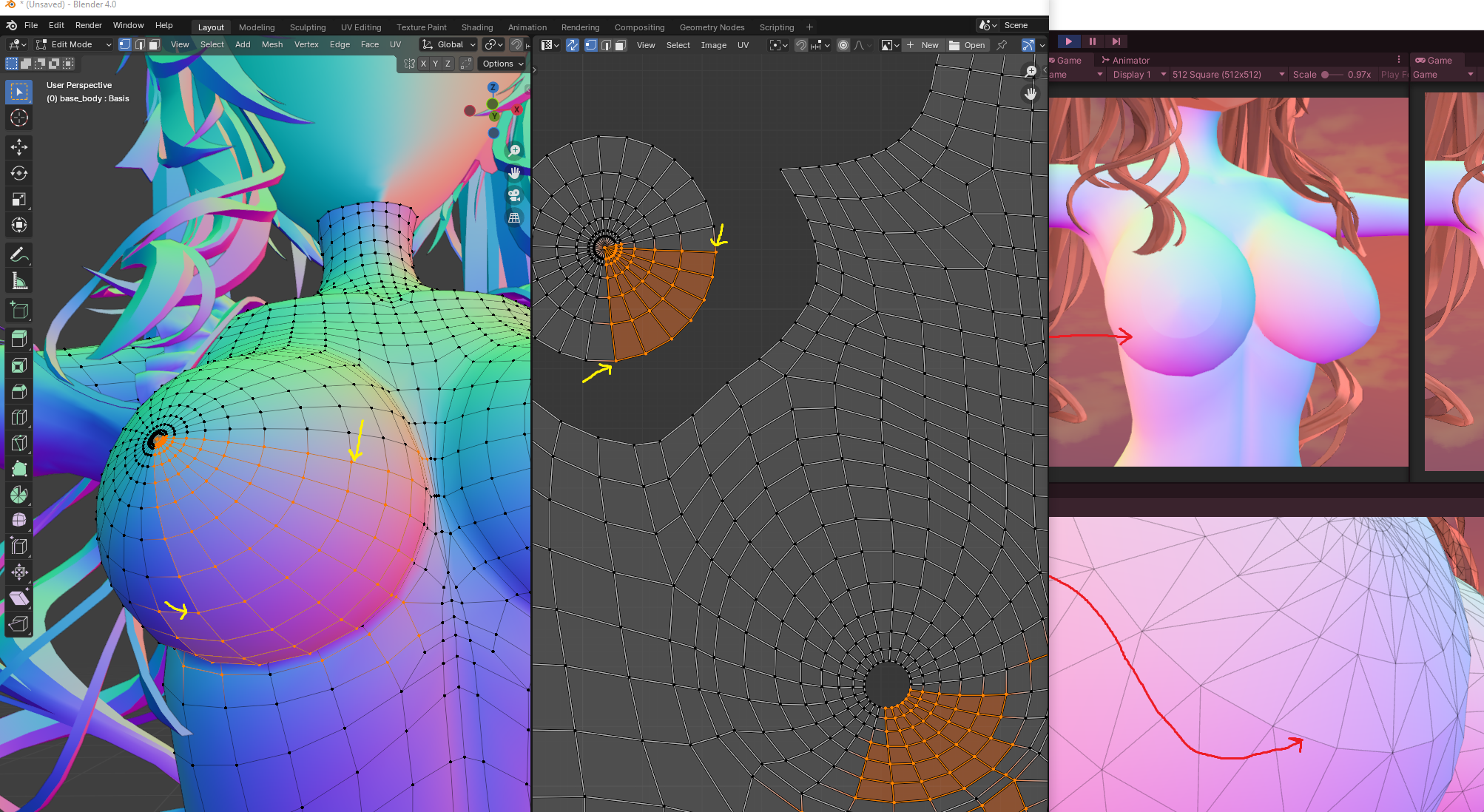
In order to remediate this, I have opted for the following strategy.
- Before recalculating normals, I store the indices of every set of points that have the same position and normal into a data structure.
- These points are effectively UV seams.
- I do not check for tangent equality, since the tangent is based on the UV data which may be different.
- Then I recalculate normals using
RecalculateNormals. - After recalculating normals, I reuse that data structure to re-recalculate normals of only those indices by averaging and normalizing them.
- Then I recalculate tangents using
RecalculateTangents.
This isn’t perfect, but it’s a good trade-off. See the source code here, especially the ReRecalculateNormalsInUVSeams method and its callers.
Overall strategy
The overall strategy is the following:
- Create a SkinnedMeshRenderer for the purposes of baking, and set all blendshape weights to 0.
- Use BakeMesh to build a static Mesh from that skinned mesh.
- Recalculate the normals and tangents using the remediation described above.
- I recalculate the normals and tangents even when 0 blendshapes are active, because we want the delta normals and delta tangents to be calculated based on what Unity thinks the normals should be, rather than what the normals are.
- This mesh is the base recalculated mesh.
- Then, for each blendshape to recalculate individually (we do not recalculate all blendshapes):
- Set the blendshape weight to the maximum (technically, do this for each weight of each frame of the original)
- Use BakeMesh to build another static Mesh from that skinned mesh.
- Recalculate the normals and tangents using the remediation described above.
- Store the difference between the normals of this individual blendshape mesh with the normals of the base recalculated mesh.
- Store the difference between the tangents of this individual blendshape mesh with the tangents of the base recalculated mesh.
- Those are the delta normals and delta tangents we’ll have to write back into the mesh later.
- After all of this is done, rewrite the modified blendshapes back into (a copy of) the original mesh.
- The Unity API does not provide a way to edit a single blendshape, so we have to circumvent this by clearing all blendshapes and rewriting all of them.
- That’s why delta normals and delta tangents are stored, so that we do this rewriting operation once instead of several times.
Since the subsequently calculated deltas is only based on Unity’s judgement, it means that if Unity judges that a normal doesn’t change, the delta remains zero.
Deltas must not be calculated by comparing the artists’ judgement with Unity’s judgement, otherwise the two will disagree on almost all vertices, resulting in a change of the shading of the entire avatar. It is specifically avoided here by recalculating the normals even on the base mesh that has 0 blendshapes active.
Even vertices that don’t move will be recalculated
All vertex normals and tangents are recalculated, even if the vertex position is not changed by a blendshape. This is because when a vertex changes position, all of its smoothed neighbours will also change normals, even when that neighbour does not change position.
If recalculation were limited to only vertices that moves, I’ve experimentally noted that this causes a weird shading “aura” effect to be visible, especially on blendshapes that flatten parts of the body. Therefore it’s better to remove this limitation so that shading remains consistent.
This should cause a small increase in VRAM usage because of those neighbouring vertices being affected, and I am counting on the stability of RecalculateNormals to produce delta normals and tangents that are equal to 0 for all unaffected vertices.
Finally
I’ve added an UI that suggests blendshapes to add. Since face expression blendshapes should probably not be recalculated, and conflict prevention blendshapes should not either, this is a user selection process.
Anyways, this tool is under the MIT License. Please use it freely under the terms of this license! Maybe add it natively to VRCFury or something.
Documentation:
Recalculate Normals | Haï~
Improves the shading of SkinnedMeshRenderers by recalculating select blendshape normals (and tangents).