2022-04-04 Subtitles postmortem
このページは日本語でご覧いただけます: 日本語
I’ve created a Subtitle system for my “Offline” world. This was originally intended for me to watch a JP movie with English subtitles from YouTube.
Subtitle systems already exist but the few ones I know are designed for movie lists. This one is specifically for letting users pasting subtitles for arbitrary videos.
SubtitleManager.cs - Shared to twitter
Instantly share code, notes, and snippets. SubtitleManager.cs - Shared to twitter You can't perform that action at this time. You signed in with another tab or window. You signed out in another tab or window. Reload to refresh your session. Reload to refresh your session.
Another user has built upon this implementation.
https://twitter.com/loljacklul/status/1510610024925741065
Here’s a postmortem of my experience while creating this subtitle prefab.
Subtitle format
I’ve settled with the SRT subtitle format (SubRip), as it appeared to be widely supported. It can be easily parsed, and there’s no much layout concerns about it.
Subtitles are usually sorted by the time they appear, and this becomes an assumption in my Udon implementation: Parsed order is assumed to be the appearance order.
The only weird quirk about this format is that it’s not really specified what should happen when two ranges of timestamps overlap ( https://www.youtube.com/watch?v=FqJ21-GaYew ).
The approach I’ve taken is that when two subtitles overlap, multiple subtitle text will be displayed with a line break in between, and the display order is always the timestamp order; not the “last appearance” order.
In addition, it is assumed that an overlapping subtitle A will not overlap again with a subtitle C if a subtitle B that started after A started, finishes before A finishes.
Copy pasting
This article was written in April 2022, half a year before the introduction of the native String Loader.
Using a string loader is arguably the better solution today, but this section still may contain relevant information for other uses.
I am making a video player world, not a movie world, so there is no predefined list of movies. I cannot preload subtitles, the user is free to use any SRT subtitle of their choosing.
Some movies or documentaries have very large subtitles, crossing the 300KB range in file size. However, Unity Text fields can only support around 16K characters, which makes copy pasting fail.
To work around this, I am using a TextMeshPro Text field, which does not have this limitation, letting the user paste absurd amounts of data. This causes several problems:
Not accessible via Udon
TextMeshPro text is not accessible via Udon. In order to copy the text, I had to wire up some Unity events to set the Text element of a Unity UI Text object. Then, I could access the UI Text in Udon.
When the text is displayed, it lags during and after pasting
Pasting large amount of text will cause two issues:
- It causes a huge hitch right after pasting, there is no choice but to wait a few seconds.
- While subtitle text is displayed in the field, performance will drop significantly. The performance drop was significant when I tested with a 300KB subtitle file in Japanese.
The text field needs to be cleared as soon as it is submitted in order to regain the performance. However, I have personally not found an easy way to clear the field. Maybe there is a way but I don’t know. The way I did it, is to duplicate (VRC Instantiate) a hidden template copy of the Text field hierarchy, and destroy the previously used text field hierarchy.
Syncing
This article was written in April 2022, half a year before the introduction of the native String Loader.
Using a string loader is arguably the better solution today, but this section still may contain relevant information for other uses.
If the local user wants to benefit from the subtitles pasted by another user who shares the preferred language of the instance, they need syncing.
Following advice, requesting serialization of anything above around 60KB may fail.
To work around this, I’m chopping up the string with an arbitrary number of characters (8192 characters), and sending them one by one. Since I don’t know the underlying network constraints regarding string sync, the size in characters is intentionally way lower than the maximum size in bytes.
Given the size of the problem, increasing this number or decreasing this number by a bit will not make a huge difference in transmission sync. Remember this is used for watching long movies, the subtitles are not going to change every minute, and players are expected to stay in the instance longer, so sync speeds are not a concern. For the same reason, there is no string compression because that would be overengineering in that context.
Tracking
Before sending text to be displayed, I am tracking the video player current position.
During normal operation, the subtitle manager keeps track of the last displayed subtitle index, displays it and any other future subtitle (if there are any overlapping ones), and moves on the the next after it is complete, so that we don’t traverse the entire array every frame.
When the video player rewinds at any point, the subtitle manager reads all subtitle timestamps from the 0 index of the array up to the first timestamp that matches the current time.
Displaying
To display the subtitles, I am exploiting two TextMeshPro Text tricks:
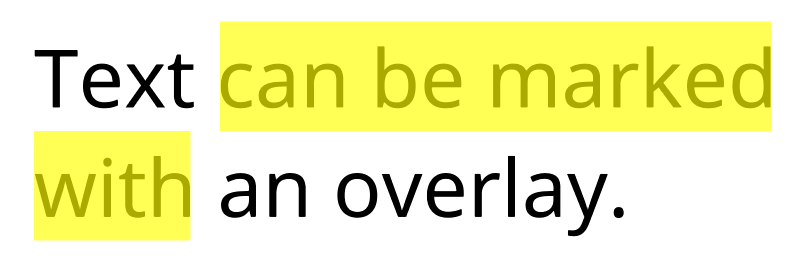
- Marks as a backdrop ( http://digitalnativestudios.com/textmeshpro/docs/rich-text/#mark )
Marks allows to overlay text. Normally, this is used for outlining, but here, we want it to be used as a subtitle background. If we just outline the text, it will cause it to be darker.
To achieve this, there are two Text objects, one for the normal text, one just for displaying the background.
The background Text is fed with$"<mark=#000000>{buildingText}</mark>"
- Outline for black border ( http://digitalnativestudios.com/textmeshpro/docs/shaders/ )
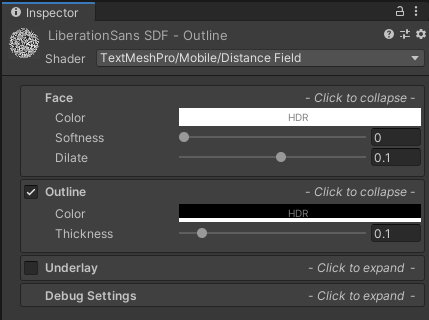
In order to increase the legibility of the text, I’ve added a black border to the subtitles on top of the existing backdrop. This is done by changing the outline setting of the material.
Dyslexia
Apparently the above settings seems to work well for someone with dyslexia.
https://twitter.com/exe_elf/status/1496023742048313344
https://twitter.com/exe_elf/status/1496060055992639489
thank you! also thank you for making this yellow, that always makes it a bit easier to read subtitles with dyslexia for me
For me personally, rounder open fonts, and bright colors (like yellow!) work wonders, tysm 4 the consideration
I’ve added an option to choose a custom font claimed to be better identifiable for dyslexic users, even though the current font seems to be fine.
Vector of attacks
The subtitle system was not designed to resist attacks, as it’s meant to be used for chilling in a trusted environment with friends.
In a public environment, a motivated attacker could use a malicious subtitle file to attempt displaying large amounts of text to cause a performance hog, or to use problematic rich text in subtitles, or to cause a large amount of text switching, or by clogging the network in one way or another causing object ownership issues.
Various sanity measures may have to be put in place to reduce the use of this system as a vector of attacks. The same is true for any system that accept user input, like Udon chat boxes.